Monday, 13 October 2014

Tentacles


We were given an assignment in the previous lesson by Steve Brown. This assignment was to create a mood board of inspiration and research of our interpretation of what tentacles are. From this research we would then draw out several ideas of tentacles, just as a rough. We would then choose the one that we liked the most and carry it onto Photoshop. From here will would color and try to touch it up to become a realistic looking piece.

I'm quite worried about the task as I'm not a very quick sketcher, but I think this is why we have been doing the life drawing sessions, to not only get our skill up, but to get our speed up as well.

I've started off by creating the mood board. This contains everything that I believe to be inspiration on the subject of Tentacles. 

Everything that I believed to be inspirational.
There are many different images in the board that were what I thought when it came to Tentacles. As you can see, there are a lot of references to comic book characters such as Carnage and Venom from The Amazing Spider man and Jackie from The Darkness. I also have a fair few video game references such as Gears Of War, Fallout and Mass Effect.

I believe Tentacles to be something dark, something sinister. That's why most of the ones on my board aren't cute in any shape or form.

After this stage, I managed to create a mind map towards more specific classes of tentacles than just the mood board.
My tentacle mood board,
Next, I decided that I would create a list of all my favorite tentacles that I have ever seen, this way, i can determine what works well on a tentacle and what aspects I may include in  my ones.
Favorite tentacles part 1.
Favorite tentacles part 2.
I decided that the next step would be to draw several quick designs based on the ones that are in my mood board. These drawings will have a very limited amount of time spent on them as I want to show the development as I go along.
These are my two rough drawings.
As you can see I have crafted two rough version of creatures with Tentacles. One I call The Consumer, the other I call The Octo-Eye. By looking at them you can tell I have gathered various different sources of research and have tried to put them into my pieces.

With The Consumer, I tried to go for a humanoid Octopus. There used to be a whole race of his kind until hunting had sent them into oblivion, now as the last of his kind, The Consumer has taken it upon himself to end those who bought injustice on so many. At the end of his tentacles are spiky suction pads, which will fed him.

With The Octo-Eye, I tried to draw a clam with tentacles coming out of it, the result which I was very happy with, so I decided to add just one eye, to make him creepily stand out. These Octo-Eyes are the main sea creatures on a human colorized planet. They live at the very bottom of deepest oceans. The tentacles act as a defense mechanism, managing to fend off any attackers.

I decided that I would be taking the Octo-Eye to the next level. This means that I am going to be scanning this into Photoshop and will being using the skills that I learnt in the previous lessons to create a piece of concept art.

Heading towards the finish line.
Here is the result that I got when I finished coloring in my eye. As you can see I really liked the idea of having a traditional tentacles which were purple so I tried using quite a bit of that. Up to this point my favorite part so far is the eye as I modeled that off an actual fish eye. There is still some work to do though.
Final result 1.

Final result 2.
In the end I got two different results for the painting. As I wanted to show this creature coming out of the abyss, I experimented with Photoshop. These were the two results that I was happiest with. Though if I had to pick one it would have be the second image. I feel its because you can see the creature coming towards you more than you can in the other.  The shading and detail is a lot better as well.

Star Wars Death Star Turret on Maya


In a lesson with Robin Ledger, we had to firstly show him our fish tutorials,  once he had recognized what we had achieved, he knew we all had a basic understanding of Maya. From this point he gave us a file to open up. Once we opened it we were all mystified. I recognized that turret anywhere. It was the one off The Death Star in Star Wars. It then hit me, this is what we will be creating. My heart filled with joy as we set up our scenes, Star Wars in general contain a large amount of my favorite movies and I was extremely excited by the prospect of getting to make a part of it in its full 3D form.

This lesson was more of a do it yourself lesson than Robin teaching us. He was there if we needed him but this task was extremely independent.

Step 1.
Step 2.
Step 3.
Step 4.
Step 5.
Step 6.

Everything that you see before you was done entirely by me without any assistance. I think I am starting to get to grips with the program. I also feel that doing the fish tutorial before I started this was a great way to practice.

I am very happy with the end result and I'm looking forward starting to texture the turret. 

End result.

Bug Drawing and Painting on Photoshop


With Steve Brown we had another 2D drawing lesson. Eager to find out what it was, I got to my chair as quick as possible and opened up the word documents that were provided. Today we would be learning how to shade and color in a concept piece. I'm slowly getting used to the idea of how to shade, what colors I should use in the mix, so forth. By doing this exercise, it helps me discover my skill.

The drawing that we have gone for today is a caterpillar solider. Steve had already drawn the concept, it was up to us to fill in the blanks and add in the minor detail.

The "Bug" colored in.
We started off simply by using the palette that was provided to fill in the gaps of the caterpillar. It sort of reminded me of a paint by colors activity. After that we then had to create a shadow layer, this will make it seem as if light in reflecting in some areas, but not in others.

The shadow layer.
For this effect, I had to create a new layer, place it on top of the colored one, make the previous image invisible, then by using a grey on the paint tool to cover up the parts where I wanted a shadow. Once this is completed, I have to set this layer to multiply. By doing this I can make it seem as if this layer is sitting just on top and the two layers will almost merge.

The result.
The image above is the end process. Its a very quick and simple way of creating a decent looking image out of almost nothing. We could move on from this though and I decided that I would take this to the next step.

What I got in the end.
This is what the final result was. I'm vigorously happy with what happened in the end, especially as I haven't really done digital art that much before. I love the way that his body looks reflective, almost as if a light was shining on him. Of course there's certain parts which I feel could be better, such as the neck and body, but as I've said many times before, practice is what its all about.

Understanding Art


This was our first lecture with Bill Balaskas. As Bill teaches both Film and Computer Games Arts, it will almost be a merging of the two. This lecture was just generally what the course would entail and who would be teaching it, with a little bit of comparison of old and modern Art toward the end.

We were mainly focusing on the of what is CGA? is it art? or is it just pixels? This was explained extremely well by Bill and the notes that I took in that lecture can be found in my sketchbook.

Our First Try on Unity


As Ewan Armstrong's part of the course, we will be learning Unity deeply. Unity is a game engine, where most independent game developers will make the games. This isn't the only game engine, with many others such as Unreal and Aleph One. These are just several out of hundreds of things that you can create games with.

The reason that we will be using Unity is because on it you can create almost a limitless amount of different games, from their looks to the styles of what it is going to be. Another reason that it is used is because that it supports any platform available. This includes next Gen like the Xbox One or PlayStation 4. We were told that the community are very helpful if you have any problems, so just ask them if you are stuck.

When we loaded up Unity I was faced with a daunting task, This would be my baby over the next 3 years. This is what I will be using to make video games.

After Ewan had shown us the basics of what Unity was, it was time to start some experimentation.

My Unity experimentation.
This sort of level has all been made in Unity and is playable. This also might add to my winter project unless I decided to start from scratch. In this level, I have managed to create mist, trees and a doorway. I have also added some stairs which give the play a different sense of atmosphere.

Friday, 10 October 2014

Submerged


For One of our lessons that we had with Ewan, we had to get into groups and design a concept of a game. The concept is the idea, what the story entails, who are the characters, what is the environment like and how do you win, etc. The main part of lesson was design a "One Sheet". A One Sheet is essentially only one sheet that explains the general outline of the project. Its a way of communication from getting information from the developers to the concept artists.

Maximo's One Sheet.
We got into groups with the people sitting around us and I was pleasantly surprised and pleased with who was there. I had all the members of the foundation degree that I did last year in my group. This was good in a way as we already knew each other and could spend the hour that we had to straight away get involved with the work.

We started off discussing what type of game would it be, for example would it be horror? would it be adventure? so we all decided that it would be best if we started to write these down in the form of mind maps. This way we can gather everyone's ideas and then combine to get a true idea that suits everyone. This is the way that my mind map came out:

My mind map.
The story that we started to come up with was a horror survival. We took a lot of inspiration off of games such as Slender. Now that we had the general genre for what our game was going to be, we now had to create the story line, the game-play and how you would win. After a much heated discussion in our group, this was what we had:

The Story Line: 
You wake in the bed of an American home, no one is about and the only thing that you see is a ring on your finger, so you know that you are married. After roaming the halls of this house, very surreal things start to happen, the walls start to layer in pipes and submarine parts start to appear everywhere. There is water covering the floor which starts to raise itself. By solving several challenges and discovering who you are, only then are you free from this dreamworld.

The Game-Play:
Throughout the game you will be tasked with solving several puzzles. One such we had was locating and looking through the periscope found in the lounge. There recedes the deepest, darkest parts of your mind, trying to discover the tragedy that fell upon you, being trapped at the bottom of the ocean and losing hundreds of men. The water rising in certain levels acts like a timer, if you do not complete it quick enough, you will drown. This is a game where the environment is the danger.

How You Win:
By solving all these puzzles and locating a way out of the house/submarine, only then can you leave that dream world and be returned to your loved ones that you are fighting for so badly. You need to discover all of the past of this character and beat the demon that has been haunting you all these years.

Our collective One Sheet
I really did enjoy this task and I'm really pleased with the way we worked professionally as a group. I would like to keep an eye on this project as we all felt that if we worked on it, it could blossom into something much brighter.


Thursday, 9 October 2014

Fish Tutorial


For a homework assignment set to us by Robin Ledger, we had to create a fish using the program Maya, I recently touched up on Maya in my recent blog post "Our First Try on Maya". To get to grips with what were going to be faced with over the next 3 years. Luckily for us we had Lynda.com to give us clear, simple instructions on how to create this 3D fish.

In a tutorial that has been created by George Maestri, we follow him while he shows us not only how to create a fish on Maya but to also use Maya's hidden tools such as the different ways of shaping an object and creating more vertices.

How we started our fish.
When I first went to set up the fish, I was told by George that it would have to roughly three and a half boxes across X and two and a half across Y. Once I had created this plane, I was told to rotate it 90 degrees so that the plane was standing up and facing me.

The plane rotated 90 degrees.
In the files that were provided with the Maya tutorial, we were given several files that would be linked to the lessons. I scrolled through and one of which was a rough picture of a cartoon fish. We we end up using this temple to create our fish to.

The reason that I created a plane was so that I have something to put the fish template on. The plane acts almost as a 3D piece of tape. We can then create a material on the plane and set it to the image of the fish template. 

The fish template pasted onto the plane.
As you can see from the picture above, this is how the fish should look when pasted onto the plane. What we are going to do next is to place a cube right on top of the picture of the fish and make sure that it is completely covered. The reason we are doing this is so that we can start to line up the actual model to the template and try to replicate as best as we can.

The fish with a cube on top.
Once we have put the cube on top, we can then add some divisions on top of it. A division is basically the amount of lines that appear across the Y and X axis. With these lines, we can do many things. We can select the vertex, which is the meeting of the lines, as shown above as a little purple dot. We can select the edge, which is the line and we can also sect the face, which is essentially one side of box. For now though, we are going to be selecting the vertex. With the vertex we can move each individual one and place over the outlines of the fish template.

The vertex moved into the right position.
We can set it up so that we can see the fish drawing under the shaded block. The way that we do this is to select the shading in the top corner and then select the x-ray setting. This turns the opacity down on the block. This is very useful in situations such as this, so we can create the outline perfectly.

The fish with a basic tail fin.
The next thing that we are going to do is create the tail fin, now I got this part straight away, I had to re-shade the fish then rotate so that I could see the back of the fish. Then by right clicking and selecting the faces, I selected the bottom two and then went to edit mesh, then to extrude. By doing this I can bring out the faces. as you can see in the picture above, I done it several times so that it gives me so much more variety when it comes to building the fin fully.

The extrusion tool is probably one of the most important pieces of equipment of Maya, this is used to create all sorts of landscapes. Its also very useful when trying to put detail into an object ready for a game.

The fish's tail fin now looks more realistic.
The is another way in which to get a different result when pulling the faces, you can, when you go to edit mesh, un-tick the button which says "pull objects together". This means that they don't pull in a straight line, they pull diagonally. I found this extremely useful when I went to go and create the lips of the fish. That was one of the things that I was worried about. I wanted the lips to be the same size, but not joint together and this is perfect for that.

The lips of my fish.

Our next task from George was to create the fins. What we were told to do was to grab the lowest face and to extrude it. Once we had done this we would end up selecting the two faces on the top and bottom of the extrusion and add a wedge face. This provides a sample coming off of it on both sides.

The fins.

There is a really handy tool that is available on Maya and its called the insert edge loop tool. What this does is creates another division, along anywhere that you want. This is used if you want to add in that extra detail. For this tutorial, we were told that we would be using it to create the eye socket., again putting it in the Y and X axis. we would then end extruding it inside the fish and then deleting the faces on the inside to create a hole for the eyes to sit.

The eye socket.

To copy what we have done on this side to the next side, I simply selected the layer of plane that the fish template was on and have it made invisible. I then proceeded to select the fish by dragging over it and going to "edit" and Duplicate special. This meant that whatever I had done on the first side, it would be replicated on the other.

The duplication process.
By pressing 3 on the keyboard we get a smoothed out version. This works especially well when creating a smoothed skinned organisms such as a fish. This will give us a final product but first i had to add the eyes. I had some major problems when it came to putting the eyes into place. Firstly, the sockets themselves would not delete, so I had to improvise in this department by extruding them so far back that they could not be seen. Secondly I had to place the spheres into the eye sockets manually, which was a bit of a pain when it came to placing it perfectly.

The eyeball being placed into the socket.
I wanted to make the fish different, something that would make him stand out compared to the others, so I decided to make him a lot more plump. I managed to do this by grabbing the faces on each side and moving them out, giving the illusion that he is big.

The only thing that was left to do was the fin. This was something that I could do without the help of Mr Maestri, so I shut him down and did it myself. I grabbed the faces on the top of the fish and extruded them. Afterwards I scaled them together and thinned them out using various tools. 

The addition of the fin.
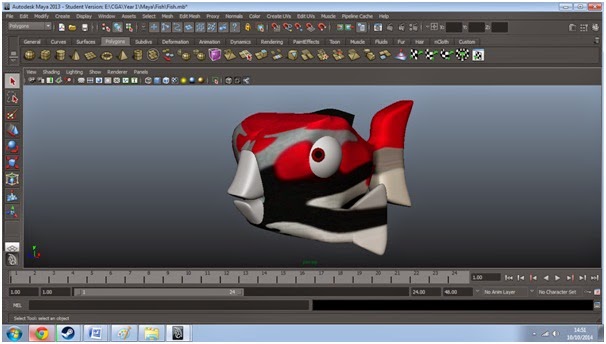
Now that I had finished the tutorial of the fish, there was nothing left to do, or was there? I decided that I wanted to go the extra mile and have my fish colored. The way I did this was to create a new material on top of the fish and color it in with one of my favorite camouflages. Once this was done I selected the mouth of the fish and choose that to be white.


Overall I am extremely happy how the fish turned out at the end. I love the way his eyes and mouth look. If I could improve one thing, it would probably be his tail, I feel towards the end, it could have been a lot thinner. 

I thought that the tutorial from Lynda.com was really helpful and I honestly believe that I learnt a great deal by using it. I am looking forward to doing a lot more with it soon.